Most of you probably knows that Excel store datetime information as float that means number of days (of part of day) after 01/01/1900. Some of the convert functions starts from 31/12/1989 because of the Leap Year Problem. .
Excel supports dates with years in the range 1900–9999, except that December 31, 1899, can be entered as 0 and is displayed as 0-jan-1900. Converting a fraction of a day into hours, minutes and days by treating it as a moment on the day January 1, 1900, does not work for a negative fraction.
Convert from Excel DATE to SQL datetime
declare @day_xls AS DECIMAL(20,10) = 36964
select dateadd(d,@day_xls,'1899-12-30')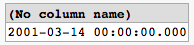
Convert from Excel DATETIME to SQL datetime
declare @time_xls AS DECIMAL(20,10) = 42853.4673621111
select dateadd(second, (@time_xls - ROUND(@time_xls,0))*86400, dateadd(d, ROUND(@time_xls,0),'1899-12-30'))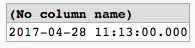
Convert from SQL datetime to Excel DATE/DATETIME
Declare @datetime datetime = '2024-08-23 15:32:32.000'
Select cast(@datetime as float)+2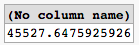
You can find an interactive version of this example following this link .
